
Latest Update: NSP registration portal for the year 2026-27 is open, register now.
National Scholarship Portal (NSP) Registration Process 2026
The National Scholarship Portal registration requires students to enter basic details such as their state of domicile, scholarship category, name, date of birth, bank information, and identification details like an Aadhaar number or bank account number.
After checking the available scholarships and their deadlines, students can begin the registration process. To make the application easier, the steps below provide a clear and simple guide to completing both the registration and the scholarship application on the portal.
Step-Wise NSP Registration Process
Step 1: Visit the National Scholarship Portal.
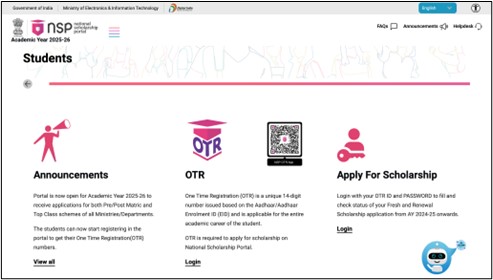

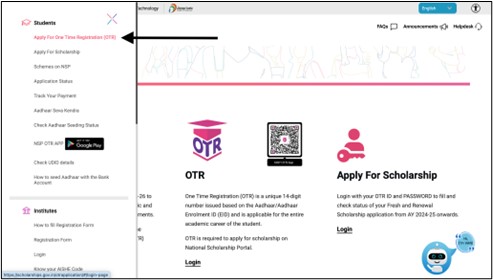
Step 3: For new users, click on ‘Register Yourself’.
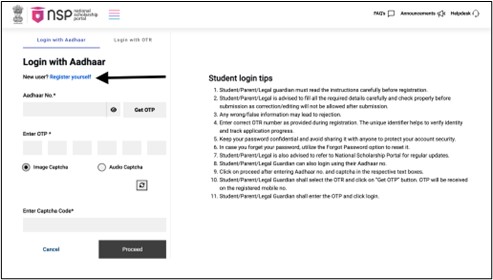
Step 4: A page of Guidelines for Registration on NSP will open, go through the guidelines carefully.

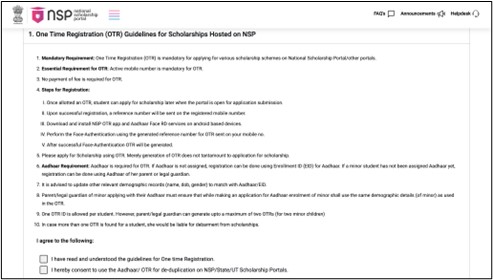
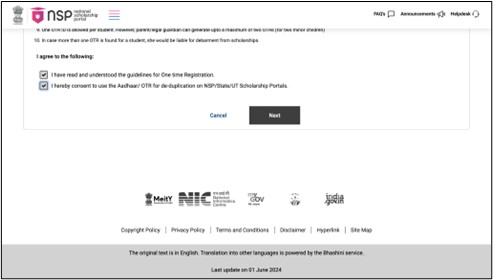
Step 5: Click on ‘Next’ to proceed.
Step 6: Fill in your mobile number and click on ‘OTP’.
Step 7: Enter the OTP.
Step 8: Fill in the captcha and click on the ‘Verify’ tab.
Step 9: Complete the eKYC Update Option by selecting any one of the three options.
Step 10: If you have an Aadhaar card, enter the Aadhaar number and click on ‘OTP’.
Step 11: Enter the OTP and fill in the captcha.
Step 12: Finally, click on ‘Verify’.
Also Read: National Scholarship Portal Last Date
National Scholarship Portal 2026 Application Process
Step 1: Click on the “Apply for Scholarship” button to apply for a scholarship.
Step 2: Two login options will appear, “Login with Aadhar” or “Login with OTR”. Choose one according to your convenience.
Step 3: Fill in all required sections and click on “Proceed” to login successfully.
Step 4: There are a few sections you must fill. Fill each section and click on “Next”.
Step 5: After reviewing your details, click on the final “Submit” tab.
Documents Required for NSP Registration 2026
The list of documents to be uploaded by the students for each scholarship may vary. However, some of the common documents that a student should keep in hand during National Scholarship Portal registration for both fresh & renewal scholarships are as under:
- Student photograph (mandatory)
- Institution Verification Form (mandatory)
- An income certificate issued by the competent
- Authority in the state/UT government is required (mandatory)
- Declaration of the student (mandatory)
- Religion Certificate: self-declaration/certification or self-attested
- Community certificate (mandatory)
- Marksheet, in case of a fresh, self-attested certificate of ‘Previous Qualifying Exam /Board Marksheet’ as filled in the form (mandatory)
- Marksheet, in case of renewal, self-attested certificate of previous year/last exam passed mark sheet (for the same/ongoing course) as filled in the form (mandatory)
- Fee receipt of current course year (mandatory)
- Proof of bank account in the name of the student (mandatory)
- Aadhaar card (optional)
- Residential/domicile certificate (mandatory)
Also Read: National Scholarship Portal
National Scholarship Portal 2026: Central Scholarship List
FAQs
What is the National Scholarship Portal?
The National Scholarship Portal is a central platform that allows students to register and apply for various government scholarships offered by different ministries, departments, and state authorities.
Who can apply for scholarships on the National Scholarship Portal?
Students studying at the school, undergraduate, postgraduate, technical, and professional levels can apply, depending on scheme-specific eligibility.
Can a student apply for more than one scholarship on NSP?
A student can apply for multiple scholarships only if they fall under different categories and meet the eligibility criteria of each scheme.
What should be done if the OTP is not received during registration?
Students should check mobile network connectivity and wait for a few minutes. If the OTP still does not arrive, the process can be retried after some time.
What is OTR on the National Scholarship Portal?
OTR stands for One Time Registration. It is a unique identification number generated after completing the initial registration on the portal. This number helps students log in, apply for scholarships, and manage their application without repeatedly entering basic information.
Comments are closed.