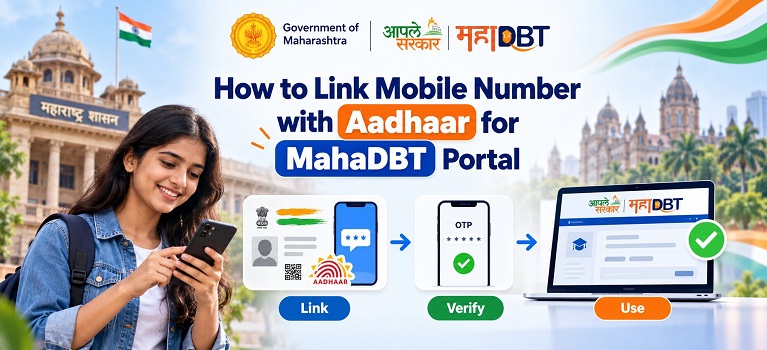
Why You Need To Register Your Mobile Number With Your Aadhaar

If your mobile number is not registered with your Aadhaar you will not receive the OTP needed to complete the authentication. As a result you will not be able to register or submit your scholarship form using the OTP. You will however have the option to complete Biometric Authentication. This requires you to be at an authorised centre. This makes the option of using OTP based authentication much more convenient to complete.
Without your mobile number registered with your Aadhaar you will not be able to complete OTP based authentication on the MahaDBT portal and your scholarships may be delayed.
How To Register Your Mobile Number
Unfortunately unlike most updates to your Aadhaar there is no option to completely update your mobile number online. As you need to provide proof of identity via biometrics you will need to go to your local Aadhaar Enrolment Centre or Aadhaar Seva Kendra (ASK).
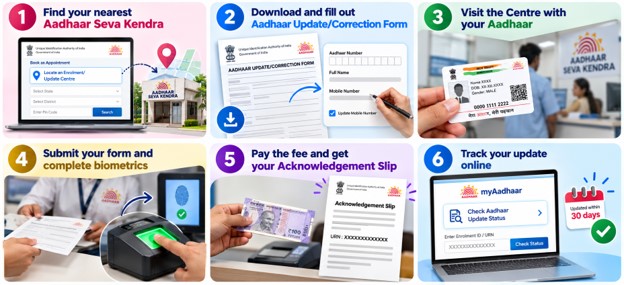
Step 1: Find your nearest Aadhaar Seva Kendra

2. Enter your State, District or Pin Code to find the closest centre.
3. You may also want to book an appointment online to save time.
Step 2: Download and Fill Out Your Aadhaar Update/Correction Form
1. Download the Aadhaar Update/Correction form here: uidai.gov.in. Or obtain a copy on the day.

3. Tick the box for updating your mobile number.
Step 3: Attend The Centre With Your Aadhaar
1. Bring your original Aadhaar Card or Aadhaar Acknowledgement Letter.
2. You will not need any other documents to register your mobile number as proof of identity will be provided via biometrics.
Step 4: Submit Your Form and Complete Biometrics
1. Give the completed form to the Aadhaar Executive.
2. They will scan your fingerprints or iris to confirm your identity.
Also Read: How to Unlock Aadhaar Biometrics for MahaDBT Portal
Step 5: Pay The Fee And Obtain Acknowledgement Slip
1. Pay the small fee and obtain your Acknowledgement Slip. Make sure to keep hold of this as it contains your Update Request Number (URN).
Step 6: Track Your Update
1. Go to myaadhaar.uidai.gov.in and select ‘Check Aadhaar Update Status’.
2. Enter your 14 digit Enrolment ID or URN from your Acknowledgement Slip.
3. Your mobile number should be updated in the UIDAI database within 30 days.
Using MahaDBT With Your Aadhaar Registered Mobile Number
Once your mobile number has been updated within your Aadhaar details go back to the MahaDBT portal. Select OTP as the form of authentication. Enter your Aadhaar number and you will receive an OTP to your new mobile number. Enter this within 30 minutes to successfully complete authentication.
If your details are still being updated and you need to use MahaDBT immediately then select Biometric Authentication.
Things To Note:
1. You will need to attend in person to register your mobile number with your Aadhaar. It cannot be done on the myAadhaar portal.
2. There is no specific document required to register/update your mobile number. Proof of identity will be provided via biometrics.
3. Make sure to keep hold of your URN from your Acknowledgement Slip.
4. Once successfully registered you can use the same mobile number for all future Aadhaar services using OTP.
5. If you have a mobile number registered with your Aadhaar but have lost access to it then this process will still apply to update it to your current number.