
Reference Number vs OTR Number
Many students confuse these two. A reference number is assigned first, when a student provides their Aadhaar and completes the initial e-KYC step. This reference number is sent to the registered mobile number and must be used to complete face authentication. The 14-digit OTR number is generated only AFTER face authentication is successfully completed. If only a Reference number has been received and no OTR, it means face authentication is still pending.
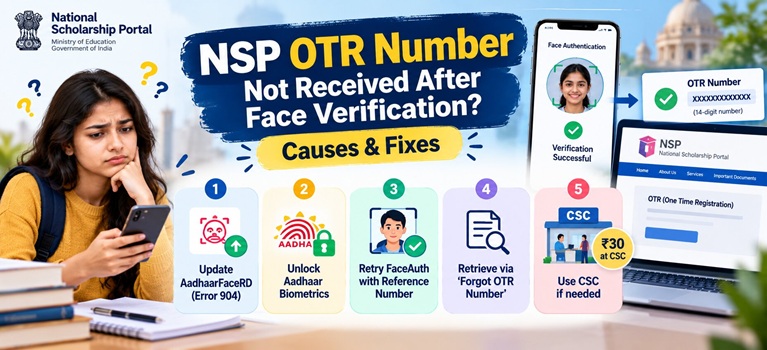
Common Reasons Why NSP OTR Number Is Not Received After Face Verification
| Reason | Explanation |
| Face authentication not actually completed | The process may have timed out or exited before the final success screen appeared |
| Error 904 on NSP OTR App | The UIDAI AadhaarFaceRD App is outdated; the official NSP portal explicitly states this as the cause |
| Aadhaar biometric lock enabled | If Aadhaar biometrics are locked via the mAadhaar app, face authentication will always fail |
| Poor lighting or movement | Insufficient front lighting or movement during the scan causes the face capture to fail |
| OTR generated but SMS not delivered | The OTR was created but the SMS could not be delivered due to network issues |
| Mobile number not linked to Aadhaar | OTP required for the process cannot be received |
| Two apps not both installed | Both the NSP OTR App and the UIDAI AadhaarFaceRD App must be present on the same Android device |
How to Fix NSP OTR Not Received After Face Verification
Fix 1: Update the UIDAI AadhaarFaceRD App (Error 904)
The official National Scholarship Portal (scholarships.gov.in) has published the following notice: “If you are getting error 904 while doing face authentication, kindly update the UIDAI AadhaarFACERD App from PlayStore.” This is the most common cause of failed face authentication.
1. Open the Google Play Store and search for “Aadhaar FaceRD” by UIDAI
2. Tap Update and wait for the installation to complete
3. Re-open the NSP OTR App and retry the face authentication using the existing Reference number
Fix 2: Unlock Aadhaar Biometrics

1. Open the mAadhaar app (by UIDAI) or visit myaadhaar.uidai.gov.in
2. Navigate to “Lock/Unlock Biometric” and disable the lock
3. Wait approximately 30 minutes, then retry face authentication on the NSP OTR App
Fix 3: Complete Face Authentication Using the Reference Number
If face authentication has not yet been completed, follow these steps:

2. Download and install the NSP OTR App from the Google Play Store
3. Open the NSP OTR App and select “eKYC with FaceAuth”
4. Enter the Reference number and click “Send OTP”
5. Enter the OTP received on the Aadhaar-registered mobile number
6. Click “Proceed for Face Authentication”
7. Ensure the AadhaarFaceRD App is active in the background; on successful authentication, the OTR number is displayed on screen and sent via SMS
8. For successful face capture: use a well-lit area, hold the phone at eye level, keep the face still and look directly at the camera.
Also Read: How to Check Aadhaar Seeding Status in NPCI Mapper for Scholarship
Fix 4: Retrieve OTR Number If Already Generated
If face authentication was completed but the OTR number was not noted or the SMS was not received, use the official recovery option:
1. Visit scholarships.gov.in and click on the OTR login option
2. Select “Forgot OTR Number”
3. Enter the Aadhaar number used during e-KYC to retrieve the OTR number
Fix 5: Complete OTR at a Common Service Centre
If phone-based face authentication keeps failing, an alternative route is available through an authorised Common Service Centre (CSC). The CSC uses a different biometric method to complete the OTR process. The cost is Rs 30 for the full process. Locate the nearest CSC at locator.csccloud.in.
NSP Helpdesk Contact
For further assistance with OTR registration or face authentication:
Phone: 0120-6619540 (8:00 AM to 8:00 PM, all days except government holidays)
Email: helpdesk@nsp.gov.in
Official Website: scholarships.gov.in
Also Read: How to Change Bank Account Details in NSP After Final Submission