

Where the Spinning Loader in NSP Appears and What It Usually Means
The loader can get stuck at different stages, and each one has a different likely cause:
| Where the Loader Gets Stuck | Most Likely Cause |
| On app launch or the first screen | Poor internet connection, or the app cache is corrupted |
| After entering the Reference Number and tapping Send OTP | Server congestion on UIDAI or NSP portal, or no internet |
| After tapping “Proceed for Face Authentication” | AadhaarFaceRD app not installed or not updated, or Aadhaar biometrics are locked |
| During or after the face scan | Weak internet preventing the response from UIDAI from coming through |
| After a successful face scan | NSP server is slow to confirm the OTR number; not necessarily a failure |
Also Read: NSP OTR App Download Link Not Found on Play Store
How to Fix NSP OTR App Continuous Spinning Loader Problem?
Step 1: Check your internet connection first
The NSP OTR app communicates with UIDAI servers in real time during face authentication. A slow or unstable connection causes the app to spin indefinitely waiting for a server response. Switch from Wi-Fi to mobile data or the other way around, and retry. A 4G or 5G connection is more reliable than many home Wi-Fi networks for this purpose.

Do not just press the home button. Swipe the app away from your recent apps list to force-close it. Then go to Settings, then Apps, then NSP OTR, then Storage, and tap “Clear Cache.” Do the same for the AadhaarFaceRD app. Reopen the NSP OTR app and try again from your Reference Number.
Step 3: Check whether AadhaarFaceRD is installed
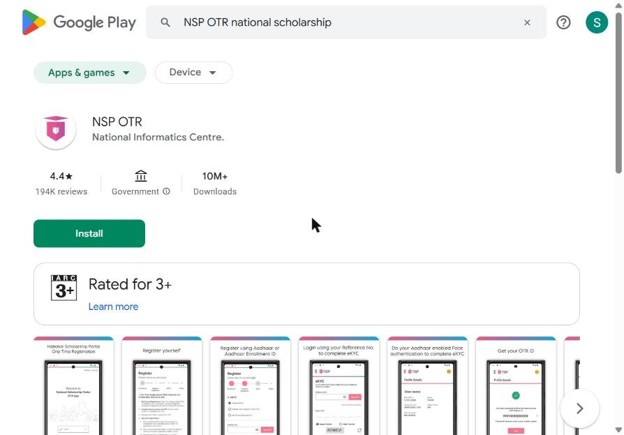
If the loader gets stuck specifically at the face authentication step and never opens the camera, the AadhaarFaceRD app is almost certainly not installed. It has no home screen icon, so check by searching “AadhaarFaceRD” in the Play Store. If it shows “Install,” download it, then return to the NSP OTR app.

Open the Play Store and check for updates on both “NSP OTR” (developer: National Informatics Centre) and “AadhaarFaceRD” (developer: Unique Identification Authority of India). An outdated version of either app can cause the face authentication pipeline to stall with no visible error message, showing only a continuous spinner.
Step 5: Check whether Aadhaar biometrics are locked
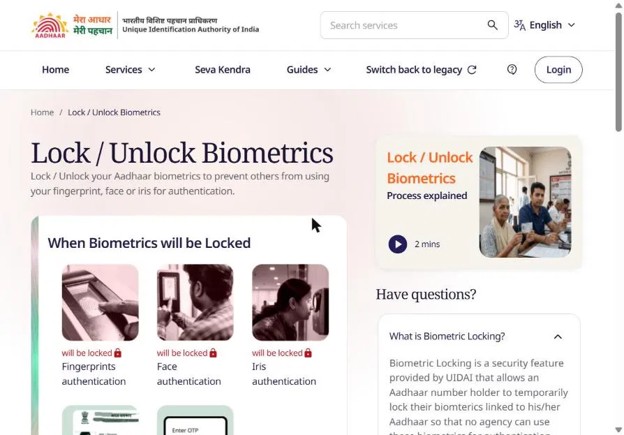
A biometric lock is a silent cause of a spinning loader during face authentication. The app starts, opens the camera, and then waits forever for a UIDAI authentication response that will never come because biometrics are locked. Open the mAadhaar app or visit myaadhaar.uidai.gov.in, go to Lock/Unlock Biometrics, and unlock them before retrying.
Also Read: NSP OTR Error 905 Camera Initialization Failed
Step 6: Try at off-peak hours
The NSP portal and UIDAI authentication servers experience high traffic during application season, particularly between 10 AM and 4 PM. If the loader gets stuck specifically after the face scan or after OTP entry, the server is likely processing slowly. Try again early in the morning (before 8 AM) or late in the evening (after 10 PM) when server load is lower.
Step 7: Restart your device
A device restart clears background processes that may be competing for network or processing resources. After restarting, do not open any other app. Go directly to NSP OTR, allow permissions when asked, and proceed.
If the loader does not move even after all the above steps, your session may need to be reset
Do not tap the back button repeatedly or tap multiple times on the screen. This can cause duplicate requests that prolong the issue. Force-close the app cleanly, clear cache as described in Step 2, and restart the entire process from your Reference Number. Your Reference Number is not lost; you can re-enter it at any time.
Visit a CSC if the problem persists
If the spinner continues across multiple sessions and devices, visit the nearest Common Service Centre (CSC) for assisted OTR registration. The total charge is Rs 30 for the full registration and application activity. Locate the nearest CSC at locator.csccloud.in.
NSP Helpline
NSP Helpdesk: 0120-6619540
Email: helpdesk@nsp.gov.in
Official Portal: scholarships.gov.in
UIDAI Helpline: 1947
CSC Locator: locator.csccloud.in
Also Read: NSP OTR Mobile OTP Not Received During Registration
Frequently Asked Questions: NSP OTR App Continuous Spinning Loader
Why does the NSP OTR app keep showing a spinning loader without moving forward?
The spinner usually means the app is waiting for a response it is not receiving. This could be a slow internet connection, the AadhaarFaceRD app not being installed, locked Aadhaar biometrics blocking the face authentication response, or high server traffic on the NSP or UIDAI platform. Each of these blocks the process without showing a clear error message.
Will I lose my Reference Number if I force-close the NSP OTR app during the spinner?
No. Your Reference Number is stored against your Aadhaar on the NSP portal and is not affected by closing the app. You can re-enter it in the NSP OTR app at any time and continue from the face authentication step.
The spinner gets stuck only during the face scan step. What should I check first?
The most likely causes for a spinner specifically at the face scan step are: AadhaarFaceRD not installed, AadhaarFaceRD outdated, Aadhaar biometrics locked, or a weak internet connection preventing the UIDAI authentication response from arriving. Check all four before trying anything else.
How do I know if the face scan actually succeeded even though the spinner kept going?
If the spinner ran for a long time and then closed without displaying the OTR number, check the “Forgot OTR Number” option on scholarships.gov.in. Enter your Aadhaar number. If an OTR was generated, it will be shown and re-sent to your registered mobile. The face scan may have succeeded even if the app appeared to hang.
Is there a time limit on how long I can wait on the spinner before the session expires?
NSP OTR sessions have a time limit. If the spinner runs for more than a few minutes without any response, it is safer to force-close the app, clear the cache, check your internet connection, and restart the process from your Reference Number rather than waiting indefinitely.